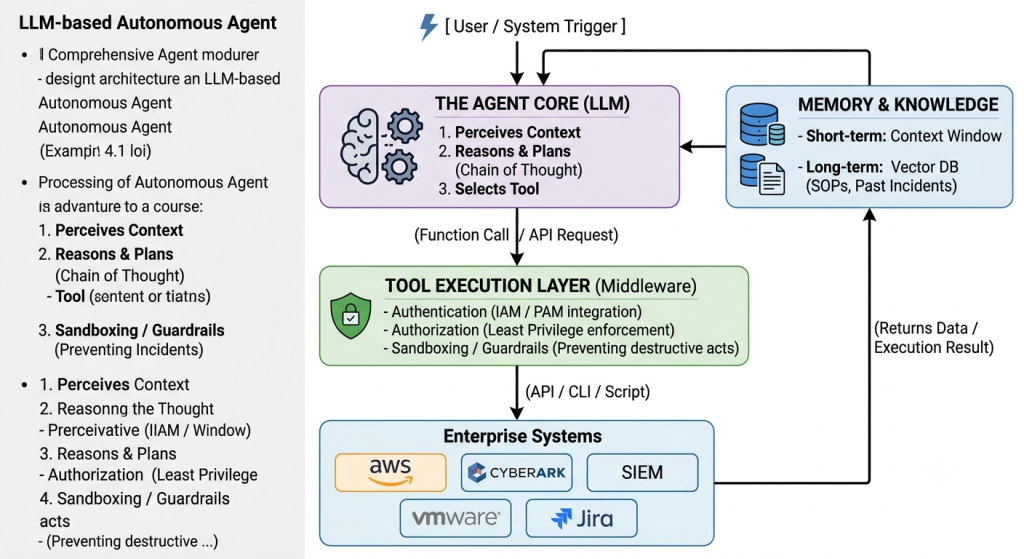
To understand AI agents from an Enterprise Architecture perspective, it is helpful to view them not merely as advanced software, but as autonomous digital workers. They bridge the gap between knowing what to do (Generative AI/LLMs) and actually doing it (APIs, scripts, and system integrations).
Here is a comprehensive breakdown of the definition, characteristics, and workflow of AI agents.
1. Definition of an AI Agent
Standard Definition: An AI agent is an autonomous software system powered by a Large Language Model (LLM) that can perceive its environment, reason through complex problems, and take independent actions using external tools to achieve a specific goal.
Architectural Definition: In enterprise architecture, an AI agent is an orchestration layer that combines the probabilistic reasoning of an LLM with the deterministic execution of enterprise APIs. It acts as a control plane that translates high-level human intent into a sequence of executable, system-level operations, effectively closing the loop between data analysis and operational remediation.
Key Distinction: A chatbot (LLM) only generates text. An AI agent generates text and executes actions.
2. Core Characteristics of AI Agents
What elevates a system from a simple script or chatbot to an “Agent”? It possesses the following architectural characteristics:
A. Autonomy and Goal-Orientation
Unlike traditional software that follows a rigid, pre-programmed sequence of if/then statements, an agent is given a high-level objective (e.g., “Investigate and contain this suspicious login”). It figures out the necessary steps to achieve that goal without requiring step-by-step human instructions.
B. Tool Use (Agentic Capabilities)
The LLM itself cannot interact with the outside world. Agents are equipped with “tools” (function calling). These tools allow the agent to interact with enterprise systems:
- Read Tools: Querying a SIEM, reading AWS CloudTrail logs, checking a CyberArk vault.
- Write/Action Tools: Isolating a VM in VMware, revoking an IAM role in Azure, executing a PowerShell script, or sending an email.
C. Advanced Reasoning and Planning
Agents use cognitive frameworks to break down complex goals into manageable sub-tasks.
- Chain of Thought (CoT): Step-by-step logical reasoning.
- Task Decomposition: Breaking a massive goal into a checklist of smaller, executable API calls.
- Multi-Agent Collaboration: Specialized agents (e.g., a “Forensics Agent” and a “Threat Intel Agent”) communicating with each other to solve a problem.
D. Memory Systems
To function effectively over time, agents utilize different types of memory:
- Short-Term Memory (Working Memory): The immediate context window (the current conversation or the current incident being investigated).
- Long-Term Memory (Knowledge Base): Vector databases or RAG (Retrieval-Augmented Generation) systems that store historical data, standard operating procedures (SOPs), and past incident resolutions.
E. Reflection and Self-Correction
A critical characteristic of advanced agents is the ability to evaluate their own work. If an agent executes a tool and receives an error (e.g., “Access Denied” from an API), it can reason through the error, adjust its approach, and try again, rather than simply failing.
3. The AI Agent Workflow (The Agent Loop)
The workflow of an AI agent is typically cyclical, often referred to as the Agent Loop or the ReAct (Reason + Act) Framework. Here is the step-by-step workflow:
Step 1: Perception (Trigger & Context Gathering)
- Trigger: The agent receives an input. This could be a natural language prompt from a user (“Why is the server slow?”), a webhook from a monitoring tool, or an automated alert from a SIEM.
- Contextualization: The agent gathers immediate context. It might pull in the alert details, the user’s identity, and relevant historical data from its long-term memory.
Step 2: Reasoning & Planning (The “Think” Phase)
- The LLM analyzes the context and the ultimate goal.
- It generates a plan: “To find out why the server is slow, I first need to check CPU utilization, then check running processes, and finally look at recent network traffic.”
- It selects the first action to take from its available tools.
Step 3: Action (Tool Execution)
- The agent formats a specific API call or command and executes it via the enterprise integration layer.
- Example: The agent calls the AWS API to retrieve CloudWatch metrics for the specific EC2 instance.
Step 4: Observation (Feedback)
- The external system processes the request and returns the result to the agent.
- Example: The AWS API returns a JSON payload showing CPU utilization is at 99%.
Step 5: Reflection & Iteration (The Loop)
- The agent evaluates the observation. “The CPU is at 99%. The goal was to find out why. I need to check what process is consuming the CPU.”
- If the goal is not met: The agent loops back to Step 2, formulates a new plan based on the new data, and executes the next tool (e.g., SSHing into the server to run a
topcommand). - If the goal is met: The agent proceeds to Step 6.
Step 6: Output & Reporting
- The agent synthesizes all the observations from the loop into a final, coherent response.
- It presents the findings to the user, or if it is fully autonomous, it executes the final remediation step (e.g., restarting the stuck service) and closes the ticket.
Visualizing the Agent Architecture
For an Enterprise Architect, it is helpful to map this workflow to system components: