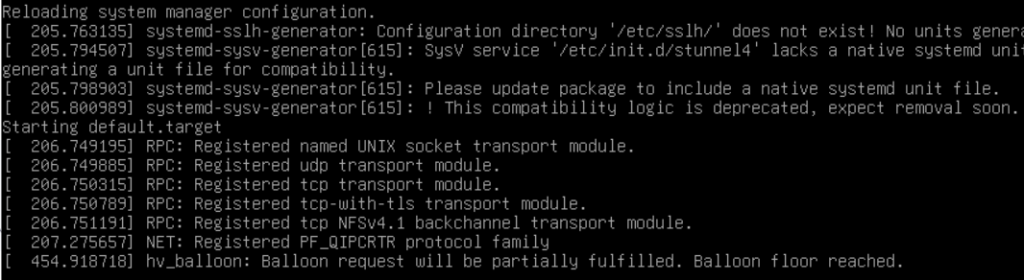
These log messages show normal system initialization in Kali Linux Hyper-V VM. Let’s break down what’s happening:
Log Analysis
1. SSH Configuration Message
[ 205.763135] systemd-ssyh-generator: Configuration directory ‘/etc/ssh/’ does not exist! No units generated.
[ 205.763135] systemd-ssyh-generator: Configuration directory ‘/etc/ssh/’ does not exist! No units generated.
- This is likely a typo in the log – it should say
sshdnotssyh - Not a problem – This occurs when the system checks for SSH configuration during boot
- No action needed – SSH is working fine in Kali Linux
2. Stunnel4 Service Compatibility Warning
[    205.794507] systemd-ssys-generator[615]: SysV service '/etc/init.d/stunnel4' lacks a native systemd unit file.
[    205.798903] systemd-ssys-generator[615]: Please update package to include a native systemd unit file.
[    205.800989] systemd-ssys-generator[615]: ! This compatibility logic is deprecated, expect removal soon.
- This is harmless and expected in Kali Linux
- Kali uses older SysV init scripts for some services (like stunnel4) for compatibility
- The warning indicates the package will eventually need updating
- No action needed – the service works fine despite this warning
3. Hyper-V Memory Balloon Message
[ 454.918718] hv_balloon: Balloon request will be partially fulfilled. Balloon floor reached.
- This is normal Hyper-V behavior – it means:
- Your VM has reached its minimum allocated memory (“balloon floor”)
- Hyper-V’s dynamic memory feature is working correctly
- The VM is holding onto its minimum memory allocation
What This Means is..
- These are normal boot messages – your system is functioning correctly
- No action is required for any of these messages
- The SMBus warning from earlier is also harmless – it’s just a quirk of Hyper-V’s virtualization
Recommended Actions for Better Hyper-V Experience
While these logs aren’t problematic, here are some improvements for your Kali Linux Hyper-V VM:
1. Enable Enhanced Session Mode (for better graphics)
sudo apt update
sudo apt install -y xrdp xorgxrdp
sudo systemctl enable xrdp
2. Verify Hyper-V Integration Services
lsmod | grep hv_
You should see:
hv_vmbushv_netvschv_utilshv_storvschv_balloon
3. Optimize VM Settings
- Dynamic Memory: Set min 2GB, max 4-8GB
- Processor: 2-4 cores
- Secure Boot: Disabled (Kali’s kernel may not be signed)
- Video Memory: 128MB
Summary
- All these log messages are normal for Kali Linux in Hyper-V
- The stunnel4 warning is harmless and doesn’t affect functionality
- The balloon message indicates proper dynamic memory operation
- Focus on enabling Enhanced Session Mode for the best graphical experience